
SimpleShoppingList10.0 - Google Play
You'll be able to see results in few seconds.
Publisher Description


Simple ad free shopping list for quick shopping.
SimpleShoppingList:• provides an easy way to create shopping lists with price calculation
• add as many shopping lists as you need
• create you own categories and units
• easy sorting of shopping lists, categories, units and items with drag and drop
• filter the list for category to see only what items are in the category
• widget to display shopping lists on the home screen
• saving of items with values for adding it in the future
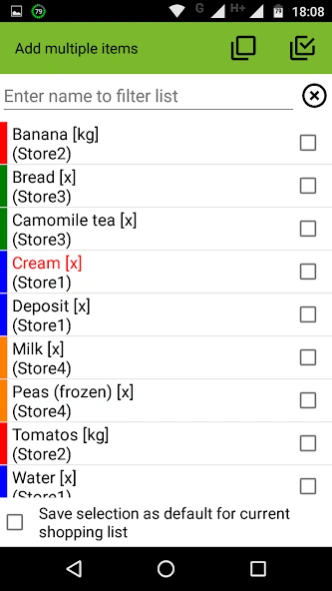
• add multiple items at the same time
• mark item with click as picked/unpicked
• light and dark theme for selection
• share shopping lists
• export/import all data of the app
• category color
• can be used as to-do list also
Add for each item:
• a name
• a unit
• categories
• an amount (optional)
• a price (optional)
• a note (optional), URL links supported
Easy (automatically) sorting of the list:
• alphabetically
• by category
• manually by drag and drop
ATTENTION: This app intentionally doesn't suppprt speach recognition.
The needed permissions explained:
• read the contents of your SD card (Photos/Media/Files): Needed to be able to load a backup.
About SimpleShoppingList
The company that develops SimpleShoppingList is ds10. The latest version released by its developer is 10.0.
To install SimpleShoppingList on your Android device, just click the green Continue To App button above to start the installation process. The app is listed on our website since 2024-01-18 and was downloaded 0 times. We have already checked if the download link is safe, however for your own protection we recommend that you scan the downloaded app with your antivirus. Your antivirus may detect the SimpleShoppingList as malware if the download link to com.simpleshoppinglist is broken.
How to install SimpleShoppingList on your Android device:
- Click on the Continue To App button on our website. This will redirect you to Google Play.
- Once the SimpleShoppingList is shown in the Google Play listing of your Android device, you can start its download and installation. Tap on the Install button located below the search bar and to the right of the app icon.
- A pop-up window with the permissions required by SimpleShoppingList will be shown. Click on Accept to continue the process.
- SimpleShoppingList will be downloaded onto your device, displaying a progress. Once the download completes, the installation will start and you'll get a notification after the installation is finished.
Program Details
System requirements
Download information
Pricing
Version History
version 10.0
posted on 2024-01-18
-changed to support Android 14-dropped support for Android prior to 4.4
version 10.0
posted on 2024-01-18
-changed to support Android 14
-dropped support for Android prior to 4.4
version 10.0
posted on 2024-01-18
-changed to support Android 14
-dropped support for Android prior to 4.4
version 9.49
posted on 2021-03-05
-green color for Android status bar
version 9.48
posted on 2020-06-05
-fixed wrong color for buttons in dark theme on newer Android versions
version 9.43
posted on 2020-05-26
-fixed possible crash at adding items
-fixed color is selection of list to copy
-preselect current list to copy from
version 9.40
posted on 2020-05-24
-fixed text color for deposit dropdown
version 9.39
posted on 2020-01-09
-fixed possible crash selecting colors
version 9.38
posted on 2020-01-05
-added option to select design
-changes for better support of Android 10
version 9.37
posted on 2019-12-26
-fixed wrong line feed in exported text
Disclaimer
Official Google Play Link
We do not host the SimpleShoppingList app on our servers. We did not scan it for viruses, adware, spyware or other type of malware. This app is hosted by Google and passed their terms and conditions to be listed there. We recommend caution when installing it.
The Google Play link for SimpleShoppingList is provided to you by apps112.com without any warranties, representations or guarantees of any kind, so access it at your own risk.
If you have questions regarding this particular app contact the app developer directly. For questions about the functionalities of the apps112.com website, contact us.
